Tips for poster design
Planning your poster
Before you rush to your computer and start designing your poster, there are a couple of things you need to do first. Planning your poster is extremely important.
- Start by writing down everything you would like to have on your poster, keeping in mind who your target audience is.
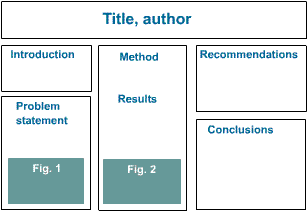
- Draw your poster on a piece of paper, adding all the different sections and headings you would like to cover in your poster as well as the text. Let someone proofread for grammatical and spelling mistakes. Example for headings are:
- title (the audience will view this first);
- introduction
- problem statement
- method
- results
- recommendations
- conclusion
Your drawing might look something like this:
- Eliminate any poster "noise". Remember you have less than 3 seconds to draw the attention of your audience to your poster. Poster noise happens when you add irrelevant or unnecessary information to your poster, e.g. information your audience might already know, etc. - this will depend on your target audience (colleagues, other specialists in this field, general public, etc.).
- Have some attention grabbers on your poster. Seeing that you don't have a lot of time to get the attention of your audience you need to make a quick impact, e.g. a catching and interesting statement, photographs, graphics, colours, layout, etc. - all of these play a role in attracting your audience.
- When you have finished your final design on paper, you can start designing it on the computer.